vTiger 5.4.0 enable backup quirk

I use the vTiger CRM product and it has a unusual quirk with enabling backups. Whilst the user interface (CRM settings -> Backup server) has check boxes to enable local and FTP backup the script actually tries to alter the following file, /user_privileges/enable_backup.php and in that set the two flags to a value of either true or false,

$enable_local_backup = 'true';

$enable_ftp_backup = 'false';

As the script has no permissions to do that then it gets a fopen() permission error (Warning: fopen(/*****/user_privileges/enable_backup.php): failed to open stream: Permission denied in /****/modules/Settings/SaveEnableBackup.php on line 43) and so when the ajax refreshes the screen it looks as if nothing has been done.

Without messing with your directory permissions then you can edit the /user_privileges/enable_backup.php manually.

Even if you manage to get the directory details into the local backup it will not work unless that enable local backup flag is set to true. It will say that it has done a backup but it will not save any file.

Fault finding CDI ignition Aprilia Leonardo

A week back we had a very violent thunderstorm. It blew up a laptop PSU (fuse blown) but the oddest one is that my scooter got blown over and when I tried to start it wouldn’t fire. Thought it was low fuel but after top-up of the tank and a lot of cranking it was pretty clear I had more of a problem. The rest of this post details how I fault-found this problem.

The ignition system for this generation of bikes is fairly simple consisting of a TDC sensor in and an output to the ignition coil primary (plus 12 V and ground).

When the ignition  key is turned on then this provides 12 V to the CDI and to one leg of the ignition  coil primary. The other leg of the ignition coil primary goes back to the CDI unit. To fire the coil the CDI unit applies and removes ground to this primary coil leg. So a high current pulse then flows through the primary which energizes the primary coil, which is then multiplied in voltage by the ratio of windings to the secondary coil, the pulse of electricity is then discharged through the ignition  leads through the spark plug to the engine ground. The CDI knows when to fire because a coil pickup on the flywheel tells it when it is TDC.

Checks – Ignition Coil and Sparkplug

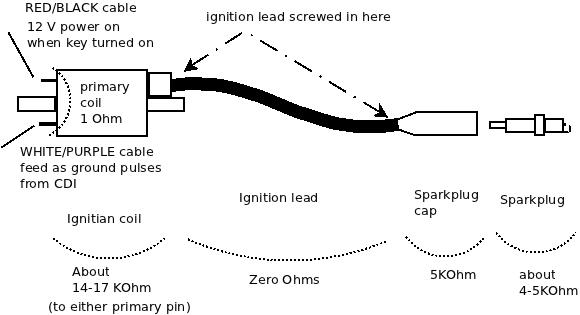
The ignition primary coil is easily checked. Looking at the coil (on the right hand side of the bike under the inspection panel), it has a RED/BLACK cable to the key, a WHITE/PURPLE cable to the CDI, a fat black cable to the sparkplug.

To stabilize the very high voltage secondary coil pulse  the sparkplug cap and the sparkplug are resistive. The cap is 5 KOhms and the sparkplug is also about 4-5 KOhms. The ignition lead is screwed into both the  ignition coil and the sparkplug cap. The coil and plug has what looks like a woodscrew poking out deep inside hidden in the coil or plug and you screw the ignition lead onto that point. The ignition lead cable can and will on older bikes have internal damage in its conductors near where the lead screws in if the cable is old. If you remove the sparkplug from the engine then click it back into the sparkplug cap then you should see about 25 KOhms from the centre electrode in the tip of the sparkplug back through to the primary coil (the primary and secondary are joined on one leg and it is only 1 ohm between the primary coil). If you do not then check the spark plug has about 4-5 KOhm resistance from its centre electrode in the tip to the small threaded end. If it doesn’t e.g. it is open circuit then replace that sparkplug and hopefully that is your only problem.

If it is OK then unscrew the ignition lead from the ignition coil secondary. Now measure the ignition coil secondary from the screw tip that you can see poking out to the primary coil tabs. If this is not about 17 KOhm but open circuit then you have a broken ignition coil but if it is a few KOhms then check the part is the same – secondary on ignition coils can be different. You really only care about shorts i.e. zero Ohms or open circuit i.e. infinite KOhms. Replace this if it is clearly broken.

If this is OK then measure from the ignition lead core wires (which you can now see on the end you unscrewed from the ignition coil) to the sparkplug cap.  It should be about 5 KOhm. If not then unscrew the sparkplug cap from the ignition cable. It has a similar woodscrew deep inside it that you screw the ignition lead onto. The cable is a multi-core of fine wire and it may have frayed and broken internally. Measure its resistance and it should be zero ohms. Wiggle the cable -  internal breaks can be felt as a soft section that more easily moves than the rest of the cable. If the cable is OK then measure the sparkplug cap and it should be 5KOhm. If it is not then replace this. If that is OK then you are disturbing the break that you originally detected and it is probably in the cable where it screws in to the coil or sparkplug cap. You may have enough spare lead to cut off the end to get to unfrayed core wires, if not then you need some new ignition cable.

Checks – CDI

In my case I did all that but it wouldn’t fire.  Now you will have to remove the bike body covering to get at the CDI. I won’t describe that but you basically remove any helmet carrier on the rear, remove the read handhold, unscrew the rear light cluster, license plate holder, undo all the little screws under the seat, the big screws towards the lower front near the feet-stands and then slide the body panel back as one big mass. The CDI is on the right hand side with a 6-pin cable plug.

Unclip this and do the following checks by poking your multimeter probes into the socket,

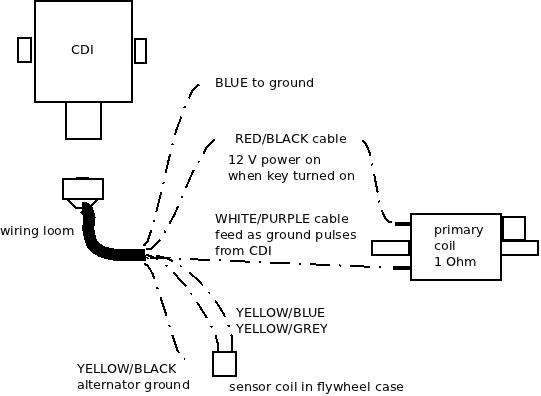
  • BLUE is Earth – make sure it is and is zero ohms to the YELLOW/BLACK
  • WHITE/PURPLE goes to the Ignition coil primary – check it is zero ohms to that coil and that when the RED/BLACK is removed from the coil primary, that there is no shorts to ground or the RED/BLACK socket (here)
  • RED/BLACK goes to the 12VDC keyed off the ignition same as the power to the coil – so should be zero ohms to the battery positive.
  • YELLOW/GRAY goes to one side of the TDC sensor coil – there should be about 240 Ohms resistance between this pin to the YELLOW/BLUE
  • YELLOW//BLUE goes to the other side of the TDC sensor coil – see the YELLOW/GRAY cable.
  • YELLOW/BLACK is Earth so should be zero ohms to the engine frame.

If all those seem to be right then you are pretty well  left with one conclusion and that is the CDI itself is not working. This is fully sealed and cannot be repaired. Your best bet is to buy one second hand. Make sure you get the exact DENSO part number.

In my case the faulty unit had the WHITE/PURPLE signal which goes to the ignition  coil primary was always on as a ground signal. It should never be always on but pulse a ground. I can only guess it was shorted out inside the CDI. All that happened was that the ignition  coil would heat up.

Checks – firing sparkplug out of engine (caution)

This is a more dangerous check but I’ll include it for completeness. You can see if the sparkplug is sparking as follows,

  • remove sparkplug from engine and click back into the sparkplug plug. Feed the ignition lead and sparkplug to the right-hand side of the bike away from the open engine sparkplug hole and so you can see the spark when you fire ignition switch
  • Ideally fit a spare sparkplug into the engine sparkplug hole BUT if you do not then you must do this testing outside because petrol mist will leave the engine so you want a lot of ventilation
  • use a jumperlead to connect the sparkplug screw thread to the engine body. I use a battery jumper lead as these are very low resistance.
  • turn on the ignition and try to crank engine. You should see a bright blue-white spark pulses even in daylight. If you do then your starting problem is not ignition but perhaps fuel. If you get only ONE spark when the ignition is turned on then you have my problem of a shorted out CDI. If you get NO sparks then assuming your test setup is fine and you have tested all the other components then it is the CDI with a faulty open circuit.

Enjoy your bike riding !

Always getting number unavailable with Cisco dial plan

Dial plans are fairly easy to read but there is one little gotcha if you enter in one of these incorrectly: you will always get number unavailable.

You need to make sure that the dial plan you have entered in is valid i.e. it uses the | pipebar for delimiters and has no spurious close brackets ‘)’

The web interlace of a Cisco IP phone does not validate your input.

PHP Warning: Invalid argument supplied for foreach()

If you get a Warning: Invalid argument supplied for foreach() but the code looks and seems to work fine then the issue is that foreach() needs an array but you are passing a Boolean due to an error in a previous function.

You will see this problem where you have something that is returning an array or false e.g. glob() and then you pass the returned value to the foreach() without checking if the variable isn’t false. e.g. in this case glob() can return false if it can’t see the path,

        foreach( $paths as $path ) {
            $filenames = glob( $path['path'] );
            if ( $filenames != false ) {
                foreach( $filenames as $filename )

In that example if glob() failed on one of the paths then it would return false. In my example above I check that $filenames is not false before I use it with foreach(). You can also use is_array() as well. To confirm your theory on your code you can add in var_dump() before the foreach() on the variable that you pass to confirm the type of the variable of what you use in foreach().


Using error_log() with print_r() to gracefully debug PHP

When debugging php code (especially Open Source code you have not written yourself) then to get a feeling of what is passed around when it doesn’t work I find that the print_r() function is very useful.

Trouble is that if you just throw in print_r() into the code where you think it is faulty then you can upset json, AJAX or your web page layouts as the print_r() splatters stuff to your displayed web page or in some cases the PHP file is not going to a browser (e.g. the PayPal IPN notify).

The trick is to throw it at the error log as follows e.g. if I was tracing what $number was being set to then I would use….

error_log(print_r($number,true));

note that you MUST set that print_r() option to “true” so that it returns a string. This string is then sent to the error_log() function which formats it with referrer details and puts it into the Apache error log.

Where does it end up ? Well on my test system on a non-vHost it is /var/log/apache2/error.log and on a vHosted server it is :/var/www/vhosts/<domain name>/statistics/logs/error_log so on your own system it will be a similar Apache error log file. Just tail that file to see what the messages are which will be something like this (in this example the $number was “2008” so the output for that error log message was,

[Sun Jan 01 13:21:12 2012] [error] [client 192.168.2.2] 2008, referer: http://19
2.168.2.250/bluebox/index.php/numbermanager/index

To synchronize the log messages with your testing then just look at the logging time.

Ring then disconnect on registered VOIP SIP trunks

The setup is a (VOIP) SIP trunk provider in the UK connecting via the internet to a FreeSWITCH PBX with the Blue.box web interface that is attached to the Internet via a NAT routed ADSL last mile. The local IP telephones connect to the FreeSWITCH PBX and the different trunks from the UK (using 3 trunks for 3 different projects) should appear on one of three of the 5 extension lines on a Cisco SPA 525G.

The trunk to the UK was registered correctly as far as FreeSWITCH/Blue.box was concerned but when you called the UK phone number from the PSTN then it rang but then went to disconnect tone. What was expected was that the call would use the SIP trunk to connect via the FreeSWITCH to the IP phone on the client site and light up the correct extension.

The problem is that in Blue.box I had configured the trunk Bind to the Authenticated SIP interface and not the Authenticated SIP NAT interface. Changed it to the Authenticated SIP NAT interface and that worked. The Authenticated SIP NAT port has port 5070, auto-detect IP address via UPnP whereas the Authenticate SIP port I have is on the fixed local LAN private IP address used for local IP phones to proxy register against. These SIP interfaces are defined in blue.box under Connectivity -> SIP Interface and the trunk is defined under Connectivity -> Trunk manager.

You will see the FreeSWITCH console log has,

2011-12-25 12:29:06.274781 [WARNING] sofia_reg.c:1445
SIP auth challenge (INVITE) on sofia profile 'sipinterface_4'
for [44XXXXXXXX@sipprovider.example.com] from ip X.Y.Z.A

for each inbound call attempt. Bit of a first day of setup gotcha.


No text-to-speech with Flite on Freeswitch/Blue.box IVR

If you have configured a feature code that uses text-to-speech e.g. a talking clock or if you are setting up an auto attendant (IVR) on a new Freeswitch+Blue.box system and you have selected the flite voice but when you connect to the auto attendant Assigned Number you get no message audio even though you have selected the Flite voice then you can test this problem very quickly.

Look at the freeswitch console log and you should see a error message,

2012-12-26 09:57:14.381330 [ERR] switch_core_speech.c:61 Invalid speech module [flite]!
2012-12-26 09:57:14.381330 [ERR] switch_ivr_play_say.c:2439 Invalid TTS module!

If you are not at the console and if you are testing an IVR then connect to the IVR from a phone and  hit one of the key mapping option numbers that you have configured for it to action and if this works (which they probably will) then your problem is that you have not enabled the mod_flite in Freeswitch source modules.conf or the module is not automatically loading.

This is easy to fix. Edit the /usr/local/src/freeswitch/modules.conf  and uncomment the line,

asr_tts/mod_flite

(also make sure that you have mod_cepstral commented out as you can’t use flite and cepstral at the same time. Cepstral is licensed, albeit not very expensive – about 30 dollars per voice – and you can test with their TTS voices though the TTS engine will periodically insert nag messages.)

Now do a make on Freeswitch. This will see that you have enabled the mod_flite and it will download the flite package from http://files.freeswitch.org/downloads/libs  (about 14 Megabytes).

Note that if you break the download then you must cd to /usr/local/src/freeswitch/libs and sudo rm -R flite-1.5.1-current*  or similar to clean up the broken download and then run make again.

After the make then do a make install.

Once that has done (or perhaps you had already had that uncommented) then you must make sure that the module is autoloaded. To check this go to the runtime program path which is usually /usr/local/freeswitch) e.g.

cd /usr/local/freeswitch/conf/autoload_configs

and edit the  modules.conf.xml and again uncomment the mod_flite line so it is  the only one uncommented,

  <!-- ASR /TTS -->
    <load module="mod_flite"/> <!-- -->
    <!-- <load module="mod_pocketsphinx"/> -->
    <!-- <load module="mod_cepstral"/> -->
    <!-- <load module="mod_tts_commandline"/> -->
    <!-- <load module="mod_rss"/> -->

now restart freeswitch. Your feature code text to speech will now work.

Truthfully though the Flite TTS is synthetic (e.g. the rms voice) and will never be as good as a human spoken voice but it does allow you to quickly setup what option codes to use and test your options before you get a human speaker to say a script.

If you are getting someone to say the script (or yourself !) in-house and want a low-cost recording solution without a professional sound recording setup then I use Audacity with an ordinary microphone (VOIP headset) and a sheet of copy paper as a de-popper. See my post here for details.

Using strace to identify Plesk 10 blank screen problems

Plesk 10 uses its own web server which runs as a process called sw-cp-serverd. This is started by init with a command line that results in the processing being called,

/usr/sbin/sw-cp-serverd -f /etc/sw-cp-server/config

That config directory is where you will find which ports it binds to and the URL re-writes. You should not change the bound port as that can upset other applications.
If you connect to Plesk on port 8443 and you get a blank screen or if you can logon to Plesk and administrative functions are blank then this is due to some problem with that server or the files that it is accessing.

To see what system calls it is doing and so help identify where to look next you can use strace as follows,

sudo strace  -p `ps -C sw-cp-serverd -o pid=` -s 8443 -o mydebugfile.txt

(note using backtics to run the ps command – if you are having trouble finding the backtic on your keyboard then you can do a ps and grep for that process name and then put the process number into that place in the strace command). If strace is not installed on your system (usually isn’t) then you can install it using your usual package manager or if using Ubuntu then I used,

sudo apt-get install strace

Don’t worry about EAGAIN (Resource temporarily unavailable) messages – this is just how it displays for non-blocking I/O when there is no data to read.

The really interesting ones are the connect(socket #..) then the writev(socket #..) and then read(socket #,..), where the socket # is the same socket number that was setup and in the writev() you can see your request with all the browser details and the read() that follows gives the response.

If the read() has a Status: 500 Internal Server Error in it then this won’t come back to your browser screen – which will stay blank.

If this happens then you have an inconsistent Plesk installation and this requires support from someone who knows how the Plesk server works.


Enabling IPv6 in Ubuntu ufw

I was creating a new web site dogstarplanet.com and as I was installing it on my IPv6 enabled host I thought I would setup the A and AAAA records for the same CNAME.

Windows based PCs without any IPv6 routing obviously ignore any AAAA records and the browser connects to the site as expected but an Ubuntu desktop I was using was unable to get to the site – both Firefox and Opera not connecting.

I loaded Wireshark to see if my traffic was leaving and though I could see the DNS queries for AAAA and A records there was no TSP traffic (Tunnel Setup Protocol) to the freenet6.net IPv4 address  (I’m using gogoc package out of the box). This means that the browser connection was not getting to the tunnel interface. This means firewalling or kernel.

If I run the Firestarter then I also see the tun (routed IP tunnel) but no traffic passes.

Well the IPv6 is in the kernel but I had ufw enabled and that doesn’t have IPv6 enabled by default so you get the error message if you try and use ping6 of e.g.

ping6 ipv6.google.com
 ping: sendmsg: Operation not permitted
 ping: sendmsg: Operation not permitted
 ping: sendmsg: Operation not permitted
 ...

If it is safe you can quickly test this is your problem by turning off the ufw with the command,

sudo ufw disable

Now your ping6 should work. If it does not then you have a tunnel problem. Use the command netstat  -rn6  to see if you have tun entries.

It is easy to enable IPv6 in ufw by editing /etc/default/ufw and towards the top there is a line of IPV6=no which you change to IPV6=yes

Save that and then disable and then enable the firewall i.e. sudo ufw enable or do a sudo ufw reload if it was still running.

Now you will be able to ping6 and connect to IPv6 enable hosts using a browser. Note that when you ping6 then there is a PTR query (that you would only see in wireshark) and you may get a no such name response if you have not configured your host DNS records right so if you are committed to setting up IPv6 on your host then please check you have added a suitable DNS PTR entry for the dotted nibble PTR part of your IPv6 address. Very few protocols, perhaps only mail connections and obviously ping6, use IPv6 PTR queries.

Pop stuck-on Pentium4 from heatsinks using Salmon slicing knife

Client PC had some weird problems; could start sometimes, would shutdown, runs “slow” though usually fine. Used CPUID HWMonitor and the SiSoftware sandra to see what’s up and the CPU temperature was high (75 Deg C).

The SiSoftware sandra processor reports a CPU temperature which correlates with the HWMonitor TMPIN1.

Got this desktop back to base and popped the hood. Cleaned out the usual dust bunnies and then decided to check the CPU seating on the heatsink. This is a socket 478 on an ASRock motherboard so levered the heatsink retaining clip but the heatsink wouldn’t come out and seemed frozen in place. Used a bit of force and when I did get it out the CPU had been pulled out too from its ZIF – the CPU was firmly glued to the heatsink by dry white heatsink compound.

I thought of what to get that off – a scalpel would be too sharp and dangerous and not big enough and then I remembered my favourite kitchen knife – the slicing/ham/salmon knife. This is 30 cm long, straight edged (not serrated), thin, about 2cm wide and a rounded tip.

I put the knife edge up to where one edge of the CPU and heatsink touched and then applied pressure. The knife broke the glue bond and the CPU was loose. Used the knife to scrape the heatsink clean.

Re-assembly was easy, re-inserted the CPU back into its ZIF socket that it had been pulled from (obviously open the locking lever first !), added usual thin smear of new thermal grease to the heatsink and put it back though you may have to do this in conjunction with the heatsink retaining clips as the heatsink may need to go in at an angle so the clips can hook into the bracket.

Screwed back in fans and powered up. BIOS looked good with a starting reading from cold of 28 deg C then working its way up to 34 deg C. Then ran Windows and now HWMonitor and SiSoftware sandra say 38 deg C and this maxes out to 42 deg C.

That’s up to a 30 degree C drop. Now the system should stay stable.

ps: As a safety note clean the knife of any residue. White greases are ceramic based and one important ceramic is Beryllium oxide which is poisonous in a loose form. These are not used for thermal grease now but may have been used in the past and unless you installed the heatsink yourself (in this case I didn’t) you won’t know what the risk is.

A fix for Korg nanoPAD PADs not working

I’d bought this over a year ago and never really got it working and put it aside as I had got a nanoKEY and a nanoPAD (Black) and just used the nanoKEY.

Recently I found this again in the cupboard and thought that I really had to get to the bottom of why it did not go (I was using Ubuntu so blamed that to start with without following it up).

I plugged it into my Ubuntu machine (10.10) and used the MIDI monitor in Qmidiroute and only saw the X-Y events – this does pitch modulation, plus the system events for the scene button but not a single event from the 12 PADs.

I also plugged it into Windows and used a MIDI monitor and also had no MIDI events for the PADs. This really did seem to be a hardware problem and nothing to do with Ubuntu. I really should have done this test before the warranty expired but this meant I could open it up without any guilt.

Under the bottom of the case under the tiny rubber feet are 6 screws. Remove these. You will see a metal plate which is the support for the 12 PADs plus a copper shield, 1 large flexible ribbon cable for the PADs and underneath that 1 small flexible ribbon cable for the X-Y control. These plug into a PCB.

With it plugged into the USB and with the MIDI monitor program going I checked I had X-Y events and no PAD events. I then popped off the clip to the large cable that goes to the PADs and as I removed it then I got events. This suggested some alignment issue or short i.e. the chip is OK.

I unscrewed the PADs metal plate – I removed the copper shield cable (it is glued at the PAD plate end) and had a look. Nothing really to see. It has the 12 square sections that are the sensor elements on plastic film and a big rubber molding for the PAD buttons. No obvious damage.

I then did something weird but I wanted to see how the pads sensor elements were constructed as it looked just like the internals of a some kinds of PC keyboards (they have a similar looking plastic film and flexible PCB though the nanoPAD uses Force Sensing Resistors); I peeled back the top layer of plastic that was over the first two buttons – JUST the first two buttons and peeled it back so that I didn’t crease the plastic. It has a lot of glue holding it down at the start and I wondered if this could be some issue but it peeled back OK (bit of force needed) and exposed the first two PAD elements (i.e.  the ones closest to the X-Y controller).

I then smoothed the plastic film back into place and plugged the PAD cable back into the PCB.

I tried it and it worked !

It is velocity sensitive and I correctly got events on all PADs with a very light touch yielding say a velocity value of 25 and a bash yielding a velocity of the maximum of 127. I hit them very hard with fingers and very light and they all seemed to be the same sensitivity.

I re-assembled; PAD metal frame screwed back, pushed back copper shield onto PAD metal frame, screwed case back on and added rubber feet into place.

Still worked. I was very pleased.

I could not see what the heck was actually really wrong in the end though I had cleared the fault. Maybe that glue was holding in moisture from manufacture ? Who knows as the problem is now gone and it doesn’t seem to be coming back for my unit yet.

I’d looked around for fixes to the Korg nanoPAD and I saw a number of people with the PADs failing even after light (or in my case practically no)  use. So I suspect a manufacturing defect and as far as I can see Korg seem happy to replace the units if you report this in warranty period so there are no real tears here except loss of your time.

It could be that the fix I described above i.e. peeling back that top layer of the plastic film on the start of the PAD sensor assembly works for you too and there is no harm in trying this if you have a broken unit out of warranty.

Side effects of fault voltage regulator on Aprilia Leonardo 125 ST

About 6 months ago the voltage regulator failed on my Aprilia Leonardo 125 ST (2001) but I’m now confident that it was playing up before that time.

I’ve had the bike for 3 years with no problems and then the battery failed earlier this year. I assumed it was just old and so bought a new battery and it was working well for a few weeks until one day I came home and smelt boiling acid. This brought back memories as I’ve worked on very large battery banks (up to 10,000 AH at 50VDC for TELCOs) and so recognised that acrid smell of heavily working batteries.

I carefully popped the seat open and removed the battery cover. Acid steam was venting. I got water, goggles and gloves and unbolted the battery and removed it. Beh ! brand new battery cooked. The next day I re-charged the battery, put it back in the bike and it seemed OK but I doubt it would last.  Everything seemed fine though with an expected battery voltage.

I’ll jump to the end and what was happening was that the voltage regulator was failing but only intermittently. It eventually failed long enough for me to see a reading of 17 volts on the battery terminals !

The side effect of this though was the following…

  • the headlights would run normally and then would run brighter. I drive with the lights on all the time and so the higher voltage meant that they drew more current and this both contributed to them blowing faster and drawing more current through the light switch. I’d noticed this but never really thought much of it. I’ve blogged about the switch failure here.
  • when the battery failed then I had trouble starting the bike and so this meant more cranking. This probably contributed to increased wear on the starter brushes. I blogged this here.
  • the increased voltage meant an increase in current overall for all systems and so this probably helped the ignition switch to also slowly unsolder itself. I’ve blogged this here.

So: if you notice your lights altering in intensity a bit, or the radiator fan changing sound/speed, or certainly if  the battery is getting hot then you must check the voltage on the battery terminals is precisely as expected (which is usually under 14 Volts).

With intermittent problems there is not really much you can do because there are no engine management system over-volt indicators on such an old scooter so you just have to be alert for these subtle indications in the lights or fan sound before you end up with a boiled battery and a whole pile of other electrical problems.

The voltage regulator is the same across a wide range of Aprilia bikes so the part can be bought fairly cheaply second hand or you can invest in a new one. Once I put a new regulator in then I replaced the battery as the cooked one couldn’t be relied on.


Aprilia Leonardo 125 loss of ignition due to faulty switch

On my Aprilia Leonardo 125 ST year 2001 scooter, about the same time that the starter motor was playing up, the ignition would fail. I initially thought this was all interrelated but it eventually stopped all together i.e. the dashboard lights would be off (no oil pressure light and no indicators) plus the headlights stayed off and the starter relay wasn’t working. It was dead.

I proved where this was quite easily once I had a multimeter. The 12 volt feed goes from the 20 amp fuse in the battery box through the wiring loom to the ignition switch. To get access to this you need to…

  1. remove the front fairing as if you were accessing the radiator
  2. remove the protective trim parts that are on the edges of the internal shield above the mats. These are held on by 3 large hex bolts
  3. loosen the front shield so that you can get inside the area behind the shield

The ignition key and switch is on the right hand side of the bike and has a long cable about 30 cms that goes to a plug. If you unplug that plug then you can test the switch operation. It is very simple on the 2001 model – no fancy electronics. The 12 Volt comes from the fuse, goes through the switch and back to the rest of the electrical system and the fuse box.

If you set the multimeter to continuity or resistance  then when they key is in the ignition on position then the switch should be closed and show a short i.e. zero ohms on that plug. Mine wasn’t – the switch wasn’t closing.

This switch is not easily field-repairable because the cables are soldered in the switch. If you want to get home then you need to simply short the socket that comes up from the wiring loom. This (in effect a “hot wire”) will work and you can get home or to a garage.

When you are home then you can inspect the ignition switch. It is in two parts – the key part which is fixed permanently to the frame and cannot easily be remove and the electrical switch part which is removable. There are two screws that hold on the plastic electrical switch but they are hard to reach. You will almost certainly have to unbolt the horn and move it up and aside to get room.

Note that you cannot use a screwdriver but must use a screw bit with adapter in a small (1/4″) ratchet wrench tool. If the radiator looks like it is in the way then it may have jumped out of its mounting – mine was (the rubber bush on the top was broken).

Once the switch is out then mark the position of the switch with a CD marker pen and pop it open. It has the usual plastic locking tabs that pop into holes so easy to carefully pull apart. What I found on mine was that the contact had heated up so much that one of the wires had un-soldered itself.

I carefully trimmed the wire and re-soldered it back into the hole. I then also sealed it in place with High Temperature Silicon sealant (red or orange) and then reassembled, screwed it back onto the ignition key switch, bolted the horn back into place and it is all working fine. Note that I initially had not used sealant and the other wire came lose about a year later. Ideally if you use sealant it should all stay in place.

I’ll post another post that brings the three problems I have had together i.e. headlamp switch faulty, starter commutator worn and ignition switch faulty as I think they are related to something that happened 6 months ago when the regulator failed.

Dead spot on Aprilia Leonardo starter motor

Another electrical problem but I found out how to prove this and discovered a very useful get-you-home fix; The problem is that I tried to start the bike but just heard the click of the starter relay.

The quick answer to what I eventually found was that the brushes in the starter motor had worn down to the last little bit (on 43,000 kms). Minor variations in the commutator meant that the brush did not touch at one point. It had a “dead spot”.

I discovered a get-you-home fix; Turn on the ignition and push the starter switch then bounce hard up and down on the seat (like you are testing the shocks). This rotates the starter motor around a little to step over the dead spot if it is a dead spot and it may start – it did for me.

If that fixes your problem then get to a garage or home in one go because what it means is probably that your starter bushes are down to the last bit of metal and this will fail to start again and the bouncing on the seat trick may not work.

As I mentioned I accidentally discovered the temporary fix but in proving what was actually wrong I also worked out a test routine as it could be one of 4 different things,

  1. the relay contacts not working
  2. no 12VDC +ve in
  3. no Earth
  4. problem with starter motor

When you push the ignition switch then you should hear a solid click of the relay every time you push in the switch. The relay is located under the right hand side of the seat and the contacts are visible through an air vent just above the right hand inspection opening. They are two large lugs.

If you don’t hear this click then you have a problem with the relay circuit from the starter switch on the handlebar to the relay. You’ll have to trace this out with a multimeter though if you are on the road and don’t have a multimeter then I would,

  • Check fuses are OK
  • check wiring connections to relay and to starter switch look ok (no corrosion)
  • check starter switch making contact (if you can you could try to prove by shorting the switch contacts with a wire)

If the relay is making a click and if you don’t have a multimeter you can test (1) and (4) by shorting the contacts of the relay with a bit of wire. Don’t short to frame – just between the contacts. One side is always 12V +ve and the other connects through the starter motor to the engine earth. With the ignition OFF if you try and short the relay contacts and they do NOT spark then the starter motor (or Earth or +ve supply) probably has a problem. If they DO spark then the relay probably has a problem. Take care with shorting this obviously.

If you do have a multimeter then testing is very easy. You should see 12 volts on one side of the relay all the time and when you push the starter switch then it should appear on the other side.  If it does not then the relay is probably faulty.

If you do see the relay working then the 12 volt supply goes to the starter motor via the heavy cable (then through the motor to the earth). With the ignition off then if you measure the resistance from the battery -ve/Earth post to the starter relay lug that goes to the starter motor (not the other side of the relay as that is always live !) then you should see less than an ohm e.g. only half an ohm (0.5 Ω) – basically a near short as the starter motor is about 500 watts so at 12 Volts that means about 0.3 ohms. If you see a high reading (more than an ohm) or an open circuit then check that the case of the starter motor is low resistance (it should be at earth) and then check that the lug into starter motor is low resistance. The starter case will be corroded a bit so make sure you are touching actual metal.

If your finding is that the starter motor has a high resistance through it then it is probably the brushes. The starter motor is easy to remove though it will clash with the carburettor so not much wiggle room. The starter motor is also easy to pull apart and if it is a worn brush then this is obvious. You may be able to get a few more starts by bending the brush housing a bit but the brush wire is what will stop you in the end. If you do bend the housing to gain some starts then you can test the motor on the bench by checking the resistance stays low between the case and terminal lug whilst you slowly rotate the motor by hand one whole revolution. It should stay low ohms at every point.

If it is an original Mitsui starter motor then I don’t believe that you can get replacement brushes assembly though an auto electrician may know of an equivalent brush part. AFAIKS the starter motor is the same for all  Leonardo 125 and 150 models for all years (96-04) and for some other models that use the Rotax Type 120/154 (120S-154S) engine (e.g. Scarabeo 125/150/200 from 99-03 and also the BMW C1 125/200 from 00-03 ). The OEM Aprilia starter motors are very expensive – but there are much cheaper “Economical” or equivalent motors that are made that are a 1/4 of the price new. Unless you know the kilometres of a second hand bike or you can actually see the bushes to see how much is left on them I wouldn’t buy a second hand starter motor.


Fixing Linksys WRT54GC – actually the PSU

Client of mine had his trading systems disconnect from the internet and his local lan device, a Cisco Linksys WRT54GC V3 – it had no lights.

On-site I checked the Linksys PSU ( a small 5V 1A adapter) with a multimeter and it showed (used a paper-clip to poke into the hole) about 4.7 volts. Which seemed OK at the time. So swapped out the client device for a spare non-Linksys Wifi router and the internet was back for client.

Got the Linksys back home and then popped the cover (see below) and powered it up. The supply pin dropped to 4.2 volts and there was only 1.5 volts on the memory chip (an ETRON SDRAM chip with pin 1 and 54 as the VDD and VSS) rather than the expected 3 volts or so.

Pulling apart the WRT54GC

The WRT54GC is not designed to be undone but you can if you don’t care about cosmetic damage. You must remove the bottom first by working your way around with a flat blade (not sharp – I used a blanking plate from the back of a desktop PC case) and popping in the plastic tabs. There are 3 tabs on the ethernet plug side, three on the aerial side, 2 on the front (middle and to right) and 2 on the reset flap side (left and right). There may be a correct tool inside the Linksys factory but I don’t know what this is – expect to break some of the tiny plastic tabs. With the bottom off then the PCB is held on by 3 screws to the top of the case. That’s it – not much to see.

Pulled apart Linksys WRTG54GC and PSU

Actually a PSU problem

Later I rechecked the PSU unplugged and it was down to 1.7 volts. What ? OK definitely a faulty PSU. I found a close equivalent of a 4.5 V PSU from a Belkin wifi repeater which had the same DC plug size and used that on the Linksys and the Linksys device came to life. Oh great so after all that it was just the PSU (which I didn’t have any 5V spares to test with).

Pulling part the Power Supply adapter

So given I had gone so far I decided to see what was inside the Linksys PSU as well and why it failed in such an odd way. These are small sealed units – they are not supposed to be opened. Used a flat-blade screwdriver and hammer to pop the cover off (you can see the insides at the bottom of the picture above) and the fault is obvious – a swollen electrolytic, a TEAPO 1000uF 10V capacitor on the output part of the PSU. Manufacturing date is (as a guess) 09/08 ? ESR in circuit says 1.4 – should be less than 0.1.

Replaced with a spare capacitor I had lying around that was cannibalised from another device (I think an old CDROM drive) and now the PSU has a 5.2 VDC level that stays steady and, more importantly, I plugged it into the re-assembled Linksys router and it all works – blinking lights. I’ll keep it powered up for while to make sure it is stable.

I will buy a new PSU for the client to use with their Linksys so I can get back my spare wifi router. I don’t want to use this repaired PSU at a client site as it is unwise given I’ve broken the PSU case open and though I’ll glue it back again it won’t be as strong a seal as the manufacturer molding. I will keep this repaired PSU as a spare for any future testing though.